

Drag-and-drop block editor for magazine articles
Editors build article layouts by dragging blocks into place, without touching HTML.
Role: Front-end developer
The problem
Magazine articles mix body text with pull-outs such as related stories, quotes, captions, newsletter promos and adverts. Laying those out meant editing raw markup, which is slow and easy to get wrong.
What I did
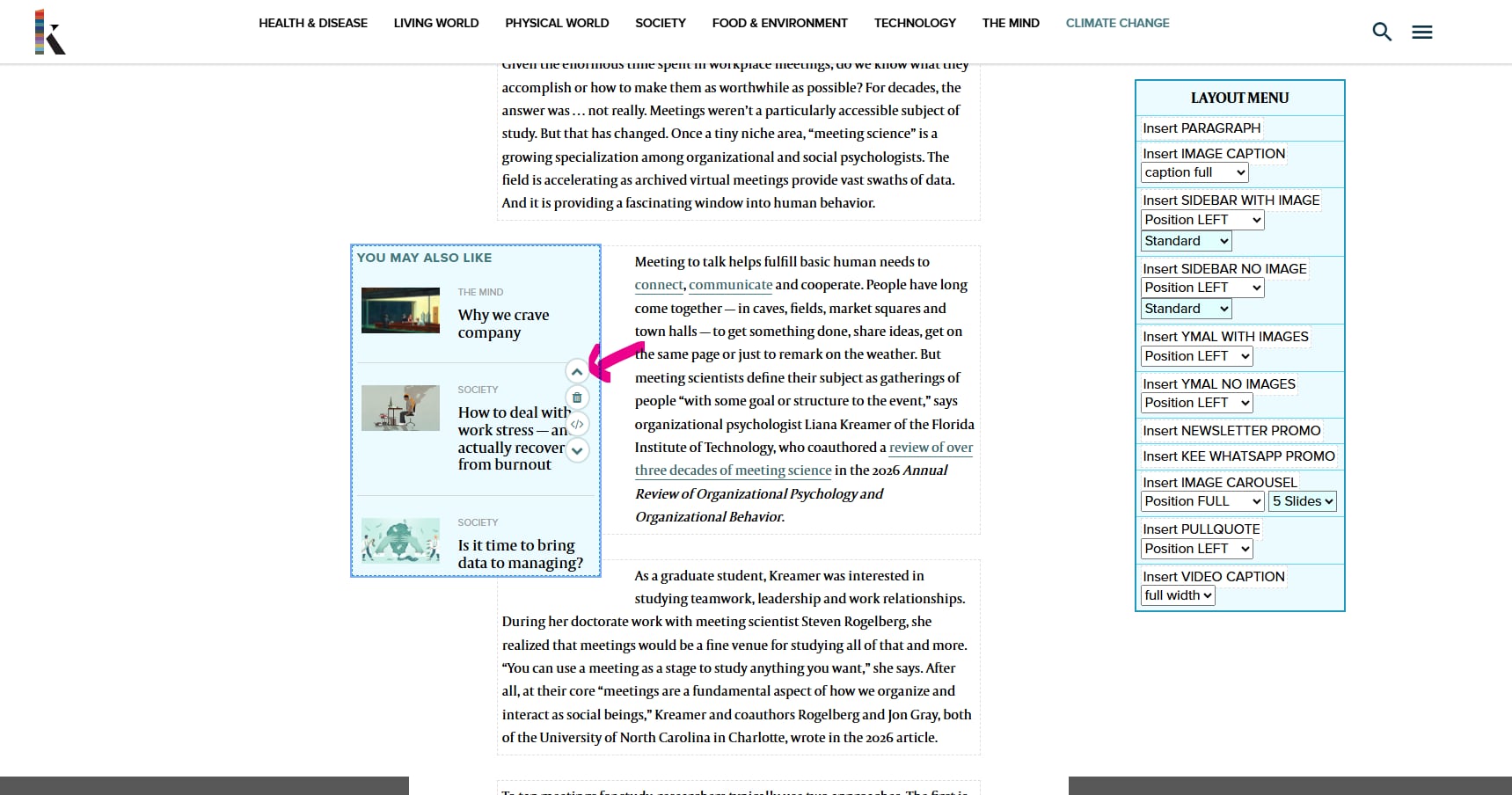
- Added a Block Mode toggle to the article page, so editing happens on the real page rather than in a separate form.
- Built a Layout menu listing every block an editor can insert, with the options each one needs (position, size, advert type) as dropdowns beside the button.
- Made article content draggable into place, with dashed outlines and a move cursor so it is clear what is being picked up and where it will land.
- Integrated a togglable WYSIWYG editor (Froala) into each block, so editors can make changes from an intuitive interface.
- Let editors move blocks around, either by drag and drop or with the arrow icons shown on the block, and remove a block completely from the page with the bin icon.
- Shared the same interface across the Katina and Knowable sites.
The outcome
Editors can build pages much more quickly. On Knowable they can now publish up to 8 articles a day, where on their previous publisher's site, which had a similar front-end design, they could publish only 4. The success of this publishing interface was crucial in Katina choosing Ingenta to build their site, which uses the same interface.